Architecture & integration
1. Architecture
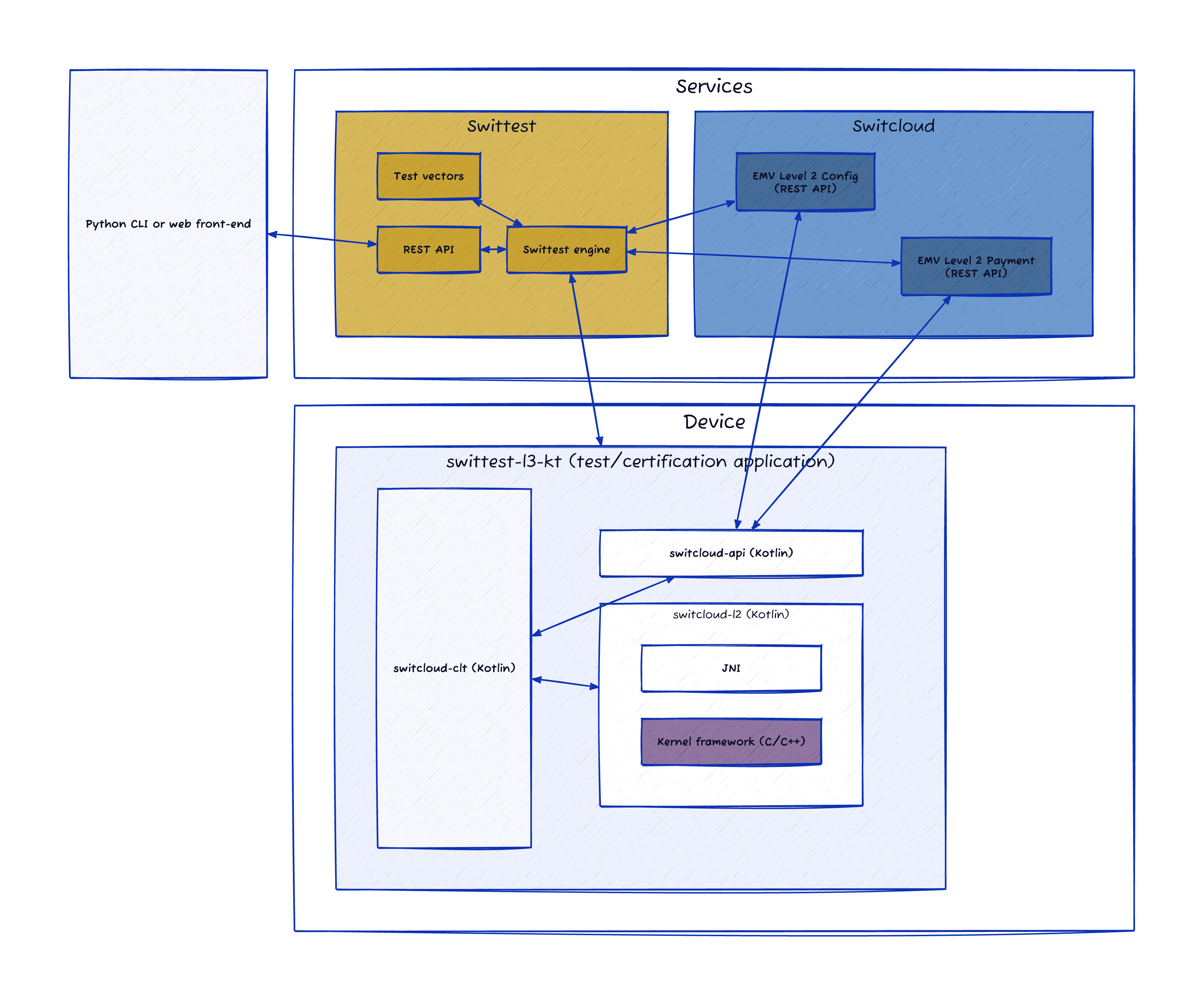
Swittest is a multi-component system which architecture is represented below.
Note
Swittest relies on Switcloud to handle card processing data (configuration and payments).
2. Integration
2.1 Kernel developpers (Android)
Switstack provides a set of Kotlin packages to help developers quickly operate with Swittest:
- Swittest L3 (
swittest-l3-kt) - Open source: This package, which source code is available on our public repository acts as a connector between Swittest service and the system under test. It is the Android application that will visibly run on the device while performing testing. - Switcloud Client (
switcloud-clt-kt) - AAR: This package, available on our public Maven repository, drives the payment processing logic and the connection with Switcloud service. - Switcloud API (
switcloud-api-kt) - AAR: This package, available on our public Maven repository, facilitates communication with the Switcloud service (REST requests wrapping). - Switcloud L2 (
switcloud-l2-kt) - Open source template: This package, which source code is available on our public repository, is the link between the payment application and the kernels. On one side it exposes a GLA compatible interface used by Switcloud Client and on the other side it connects to the EMV L2 framework available on the device. This is where the integration work happens.
2.1.1 Work to be done
Implementing your flavor of Switcloud L2 is the major part of the work to be performed. In essence, it's about converting GLA calls and GLA data model into the equivalent calls and data model in your EMV L2 framework and back. The data model, or rather the data expected to be passed on and received by GLA are described in the IGlase interface documentation. Additional information can be found in Moka documentation (from which the data model inherits) if necessary.
In pratical terms, once you retrieve the Switcloud L2 template package source code (Android project), you can start connecting to your kernels by simply implementing the ISwitcloudL2 and the IGlase interfaces. The IGlase implementation should either connect to the kernels through JNI if they are devevelopped in C/C++ or directly through Kotlin calls. The IGlase APIs are very close to EMV contactless books, in particular the Entry Point (Book-B) one.
When ready to test, you should then retrieve the Swittest L3 application package and simply override the Switcloud L2 dependency with your own Switcloud L2 generated AAR package (or project directly). For instance, simply update the app/build.gradle.kts file in Swittest L3 as follows:
// Switcloud Client app/build.gradle.kts
implementation(libs.switcloud.clt) {
    exclude(group = "io.switstack.switcloud", module = "switcloud-l2-kt")
}
debugImplementation(files("path/to/debug/switcloud-l2-debug-kt.aar"))
releaseImplementation(files("path/to/release/switcloud-l2-release-kt.aar"))
That's it, you are ready to test.
3. Testing
Once the Swittest L3 application is ready to be put under test, you can choose the client of your choice:
Note
Contact a Switstack representative to get your Swittest details and credentials.